

October’s updates give gym owners faster access to business insights and coaches more ways to support individual athletes. You can now connect your gym’s Kilo data to Claude and ask business questions in plain language. Coaches can also assign personal workouts to individual athletes, separate from class programming.
Alongside those headline releases, we redesigned the Sales Portal checkout, added options to limit daily reservations, and introduced First Class Visit and Visitor badges so your team never misses a newcomer, and Committed Club progress in the Kilo Members app.
Every update is built around the same goal: less admin work, a better member experience, and more clarity to keep growing.
Claude AI: Ask Questions About Your Gym in Plain Language
Want to know how revenue by package looked last month without pulling a report or sorting a spreadsheet? you can now connect Claude to your gym management software data and ask questions the way you’d ask a business partner.
What you can do:
- Ask about new members, cancellations, expiring packages, class performance, and revenue.
- Get quick answers without exporting and filtering spreadsheets.
- Build lightweight dashboards and summaries around your gym’s data.
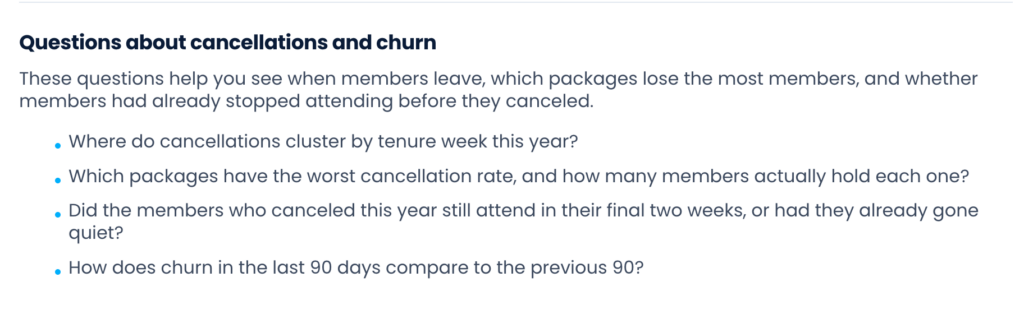
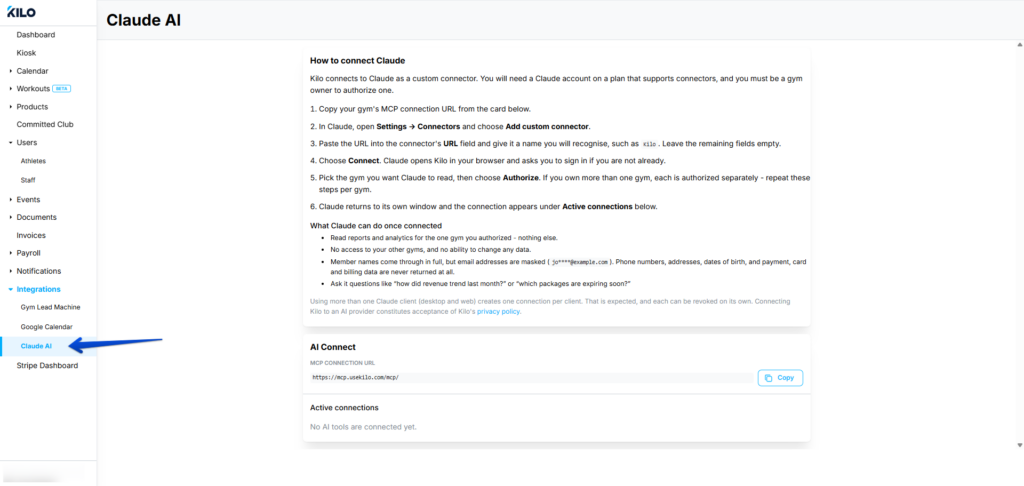
How it works:
- In Kilo, go to Settings → Integrations, find AI Connect, and copy the connection URL.
- In Claude, add Kilo as a connector using that URL.
- Log in to Kilo and choose the gym you want to connect.
The integration is available to accounts with the Gym Owner role. If you manage multiple locations, connect each gym separately.
Built with privacy in mind:
Your members trust you with their information. The integration includes safeguards to help protect it:
- Read-only access. Claude can answer questions, but it can’t create, update, or cancel anything in your Kilo account.
- Limited personal information. Member emails are masked. Phone numbers, addresses, and dates of birth are not shared.
- No payment details. Card details, invoices, and billing information are not shared.
- Connection controls. You can view active connections and revoke access at any time.
Why this matters:
You can spend less time digging through reports and more time acting on what you learn. Whether you’re checking membership trends or reviewing class performance, you have a simpler way to explore your gym’s data.
Workout Tracker: Assign Workouts to Individual Athletes
Not every athlete’s training is meant for group fitness. Personal training clients, athletes returning from injury, and members who need accessory work may all need programming of their own.
Coaches can now assign workouts directly to individual athletes, completely separate from class programming.
What’s new:
- Assign a workout from a template or a previous workout, or build one from scratch.
- Use the “Visible to athlete” toggle to control when the athlete can see it.
- Edit, replace, or delete an assigned workout without changing the original template.
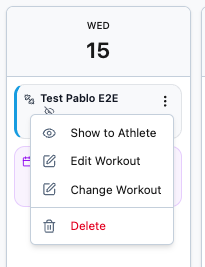
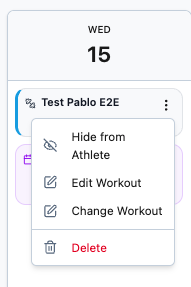

Where athletes see it:
Assigned workouts appear in the Kilo – Members app. Make sure your athletes have the app downloaded so they can access their programming.

Why this matters:
Your coaches can deliver individualized programming inside the same platform they already use for class workouts. That means fewer tools to manage and a more personal coaching experience for athletes who need something beyond the day’s class.
Redesigned Sales Portal Checkout
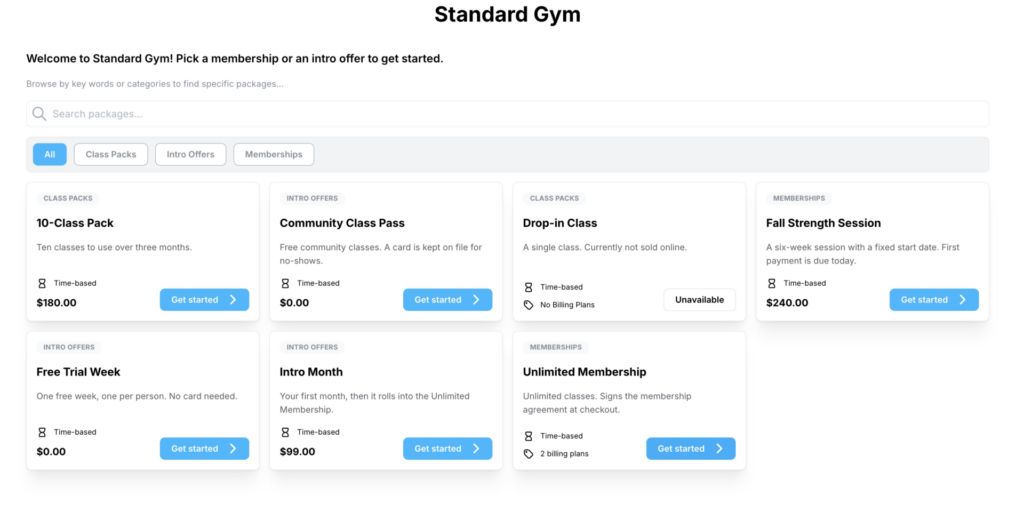
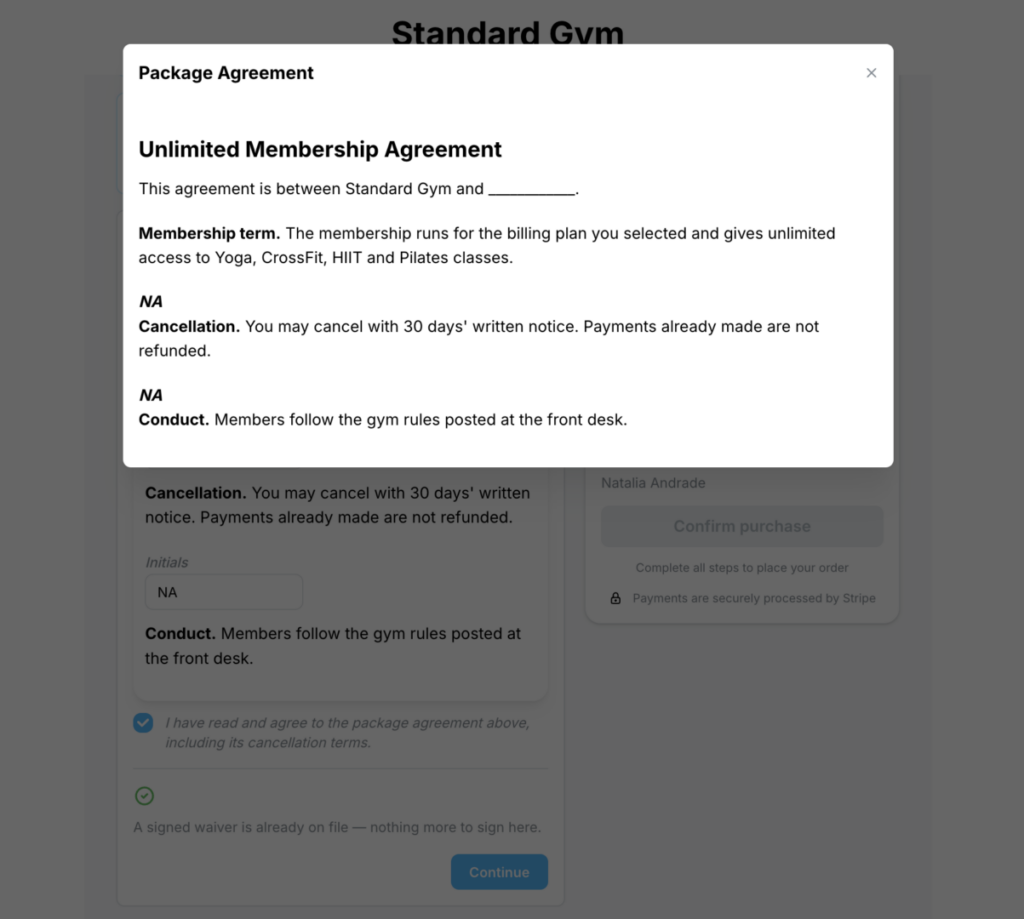
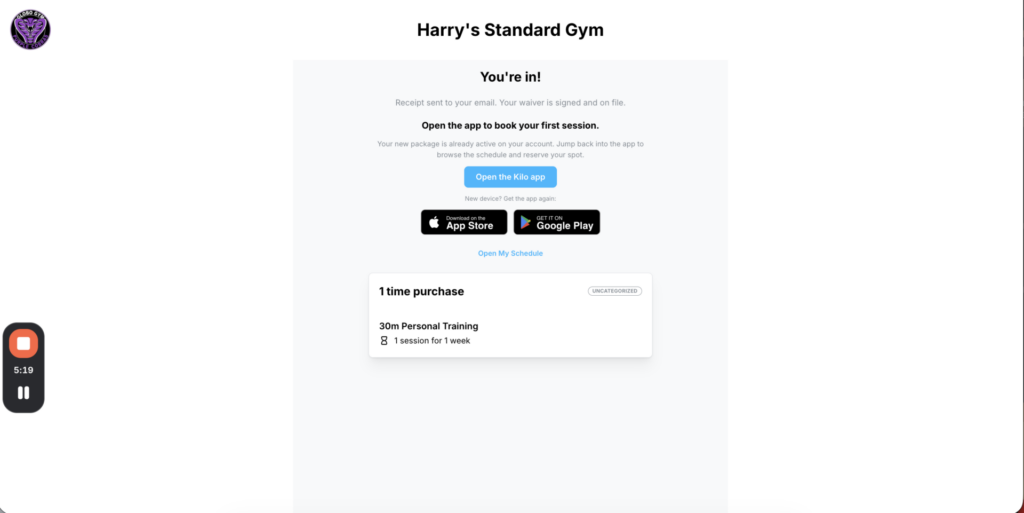
When someone is ready to buy, checkout should make the next step easy. Your Sales Portal now guides buyers through a single-page, six-step flow, from choosing a billing plan to confirming payment, with an order summary that stays in view and updates as they go.
What’s new:
- A quick plan-selection step for packages with multiple billing plans.
- A shorter checkout for returning buyers, with profile details and saved cards ready to use.
- Athlete fields, contract clauses, and waivers pulled directly from your Kilo GMS package settings.
Why this matters:
Buyers get a clearer path to completing their purchase, while your package requirements stay part of the process. Returning buyers spend less time re-entering information, making it easier to purchase again.
Limit Athletes to One Reservation per Day
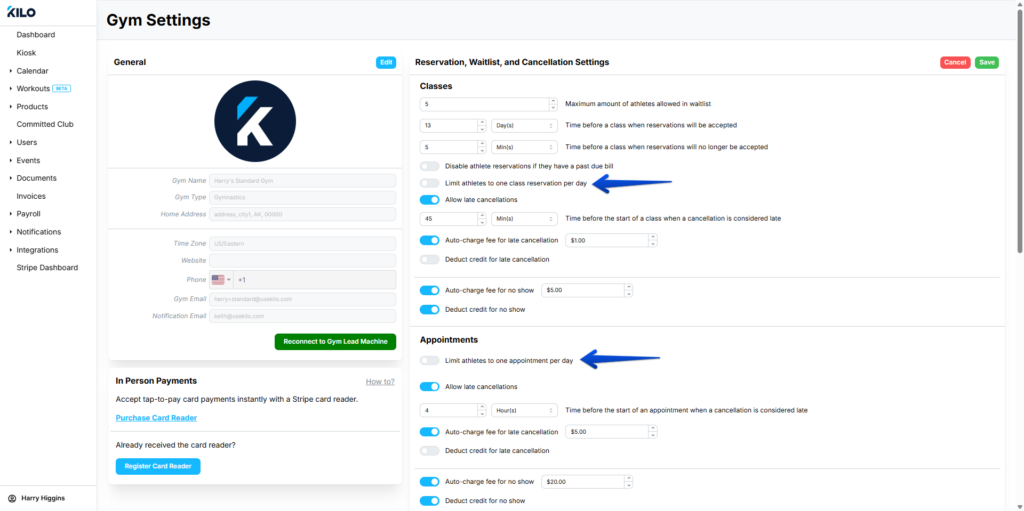
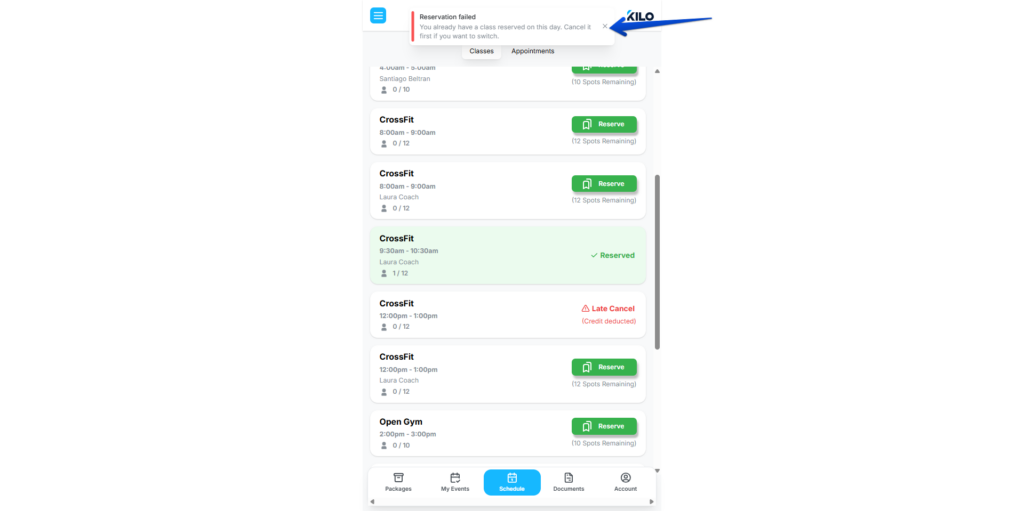
Want to keep athletes from holding multiple class spots on the same day? You can now set a one-reservation-per-day limit for classes, with a separate daily limit for appointments.
How it works:
- Turn on the class limit, appointment limit, or both in Settings → Gym Settings.
- Choose whether waitlist spots count toward the class limit.
- Staff can still add an athlete to an additional class or appointment when needed.
Both limits are off by default. Turning a limit on does not cancel reservations athletes already hold.
Why this matters:
You have more control over how athletes book your schedule, helping keep popular sessions accessible. Staff can still make exceptions without changing the rules for everyone.
First Class Visit and Visitor Badges
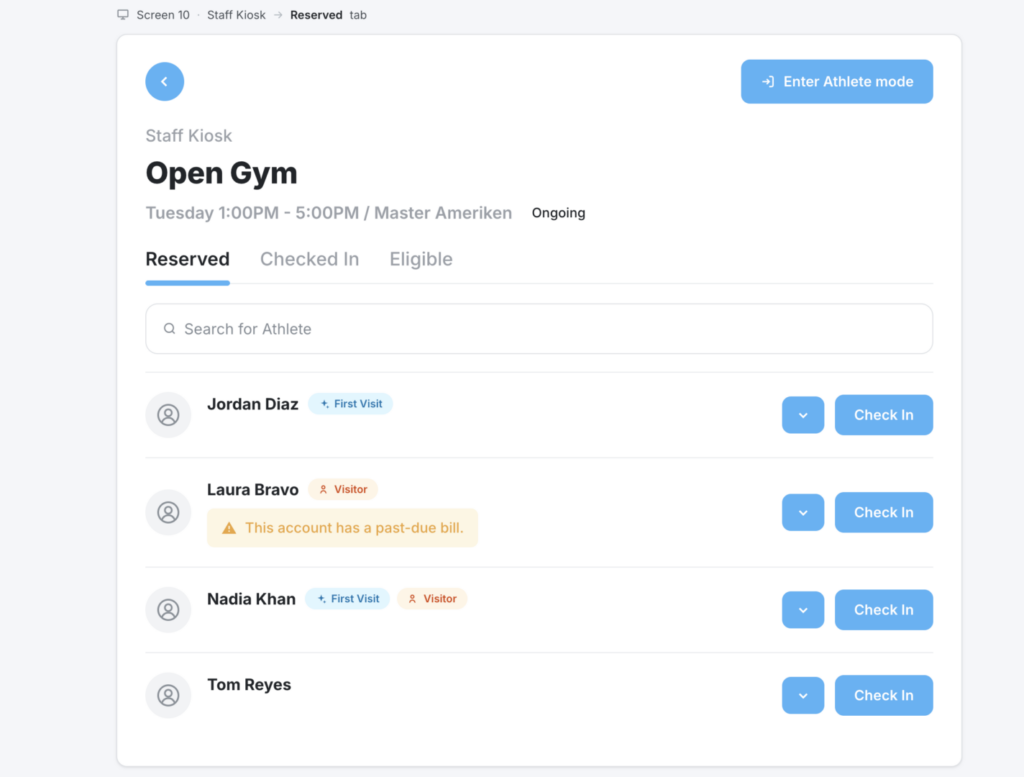
A newcomer’s first class is an opportunity to make them feel welcome. New First Class Visit and Visitor badges help your team see who may need an introduction, a tour, or a little extra attention before class begins.
What’s new:
- Badges appear next to athlete names on class reservations and in the Staff Kiosk.
- When both badges appear together, your team can spot likely first-time drop-in visitors at a glance.
- A new “First class reserved upcoming” Automation Flow trigger lets you alert coaches or front-desk staff 24 hours before an athlete’s first class.
Already using the “First class attended” trigger?
Your existing Automation Flows keep working without changes. The trigger now fires only once per athlete and takes attendance imported from your previous software into account, helping prevent longtime athletes from receiving a first-class welcome message.

Why this matters:
Your team can prepare for newcomers instead of discovering them at check-in. A timely heads-up helps coaches greet athletes by name, explain what to expect, and make that first visit feel more personal.
Committed Club Progress in the Kilo Members App
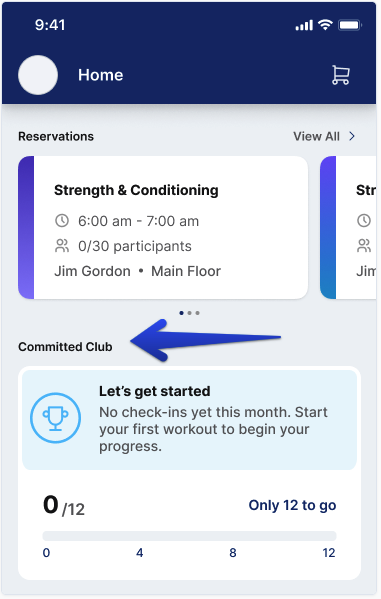
If your gym runs a Committed Club program, your athletes can now track their monthly check-in progress right from the Home screen of the Kilo Members app. The Committed Club card shows each athlete where they stand against your gym’s monthly goal, using whatever name you’ve given your program.
What’s new:
- Athletes see their check-ins for the month, your gym’s goal, and a progress bar that fills in as they get closer
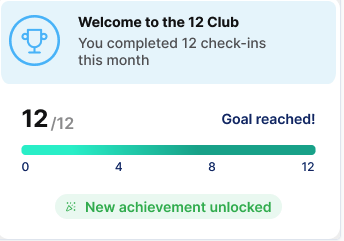
- When an athlete hits the goal, the app celebrates with a “New achievement unlocked” badge and a welcome message to the club, using your gym’s goal number
- Class and appointment check-ins count whether they happen at the front desk, the kiosk, or through a staff member, and progress resets for every athlete at the start of each month
How to get it:
Athletes need version 1.3.2 or later of the Kilo Members app and an active, on-hold, or upcoming package at your gym. Your Committed Club program also needs to be set up and visible to athletes.
Why this matters:
When athletes can see their progress every time they open the app, showing up becomes a goal they chase. Consistent attendance is one of the strongest signals of a member who stays.
Final Thoughts
This month’s updates make it easier to understand your business and support the people in it. Claude gives you a new way to explore your gym’s data, while individual workouts help coaches deliver programming beyond the class schedule.
A clearer checkout, flexible reservation limits, and better visibility into first-time visits round out the release, giving your team more control over the details that shape the member experience.
As always, if you need help or have questions, our Support team is here for you: hello@usekilo.com