In August, we rolled out a set of updates designed to save you time, reduce admin headaches, and give athletes a smoother experience. From smarter credit assignment to new contract tools and compliance features, these changes help you run your gym with less friction.
Enhanced Credit Assignment for Recurring Appts & Bulk Reservations
If you’ve ever had members book a month of recurring appointments or grab a stack of class reservations at once, you’ve probably run into the “uncredited” problem. Reservations often sat in limbo even when credits were available, leaving you to clean things up manually.
Now, the system does the heavy lifting for you. Each night, Kilo checks upcoming reservations (up to 30 days out) and applies available credits in order. And if you want to take control yourself, you can now manually reassign credits right from the athlete profile.
The result is fewer messy records, less back-and-forth, and members who see their reservations credited properly the first time.
What’s new?
- Automatic Credit Assignment (Improved): Uncredited reservations will now pull from available credits automatically each night, in chronological order, up to 30 days out.
- Manual Credit Assignment: Easily assign or reassign credits from the athlete profile whenever you need.
Why this matters:
Recurring appointments and bulk class reservations now line up with available credits—without extra work from you.
Add Initials to Contracts
We know contracts are about clarity and accountability—and sometimes a signature alone isn’t enough. That’s why you can now require athletes to initial specific sections of a contract, like cancellation policies, billing terms, or photo consent.
When creating or editing a template, just drop in the “Request Athlete Initials” field wherever acknowledgment is needed. Athletes won’t be able to complete their signature until all initials are in place.
This small step can prevent big headaches later, helping reduce disputes and giving you a cleaner paper trail.

How it works:
- Add “Request Athlete Initials” when creating or editing a contract template.
- Place the field exactly where acknowledgment is needed.
- Athletes must initial all required spots before signing.
Why this matters:
Adds clarity and legal weight, helping prevent disputes later on.
Click-to-Cancel
Regulations are changing, and more states now require businesses to make subscription cancellations simple. Instead of relying on phone calls or emails, Kilo now gives you a Click to Cancel option that keeps you compliant and gives members a clear path out.
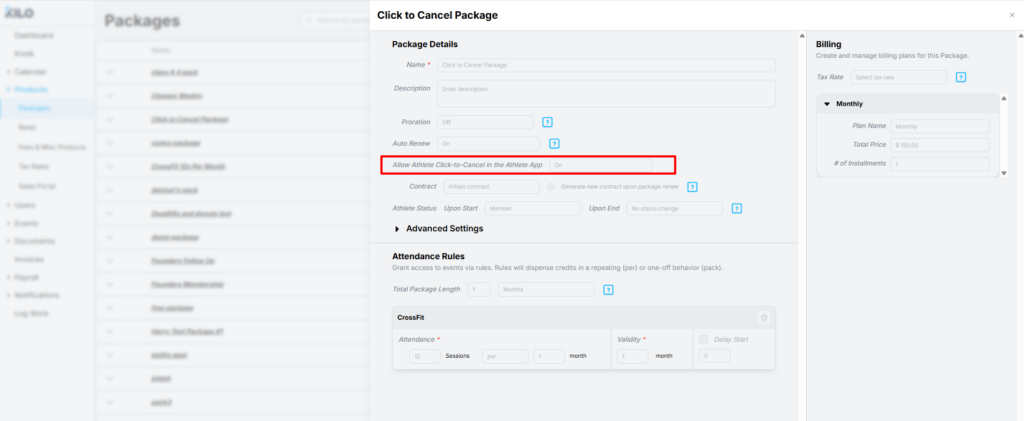
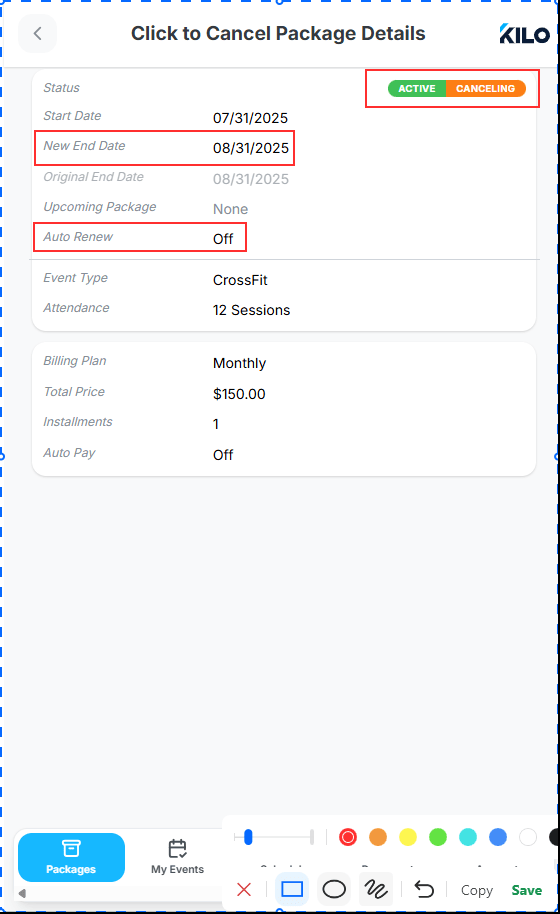
When enabled, athletes can cancel directly through the app. They confirm, receive a digital receipt, and their package updates to “active/canceling” until the end of the cycle. You keep full visibility and records — and avoid billing disputes.
How it works:
- Enable “Click-to-Cancel” in package settings.
- Athletes can cancel directly through the app.
- They’ll receive a confirmation, and you’ll keep a clear record of all cancellations.
Why this matters:
It reduces friction, helps you comply with consumer laws, and gives athletes a transparent cancellation process.
Cancel Package Logic Updates
Membership renewals don’t always go as planned, and you need flexibility to adjust. These updates give you just that.
What’s new?
- Turn Auto-Renew ON for active packages even if it was previously off.
- Turn Auto-Renew OFF to automatically remove upcoming renewals.
- Cancel prepaid packages now or in the future, while keeping invoices intact.

Why this matters:
You have more flexibility to adjust memberships without losing visibility into payment history.
Add New Event Types to Existing Packages
Launching a new class shouldn’t mean recreating every package from scratch. With this release, you can add new event types directly to existing packages, and the changes apply instantly across active and upcoming memberships.
That means you can roll out new offerings faster, update access for your current members in minutes, and skip the admin overhead.

What’s new?
- Add new event types directly to existing packages.
- Changes apply immediately across active and upcoming packages.
Why this matters:
Launch new offerings faster, without the admin burden.
Sales Portal Available via the Athlete App
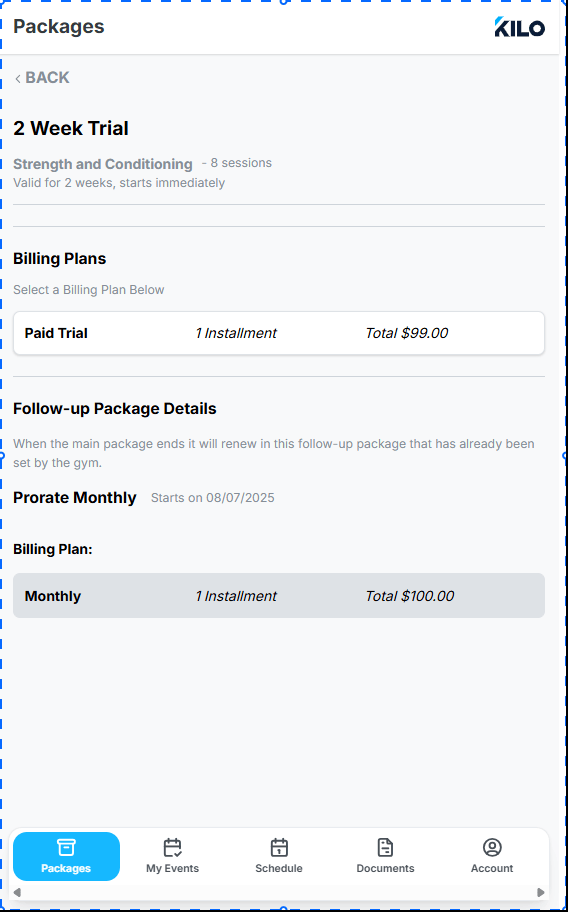
Selling memberships should be flexible, too. You can now choose whether a package shows up on your public-facing Sales Portal, inside the Athlete App, or both.
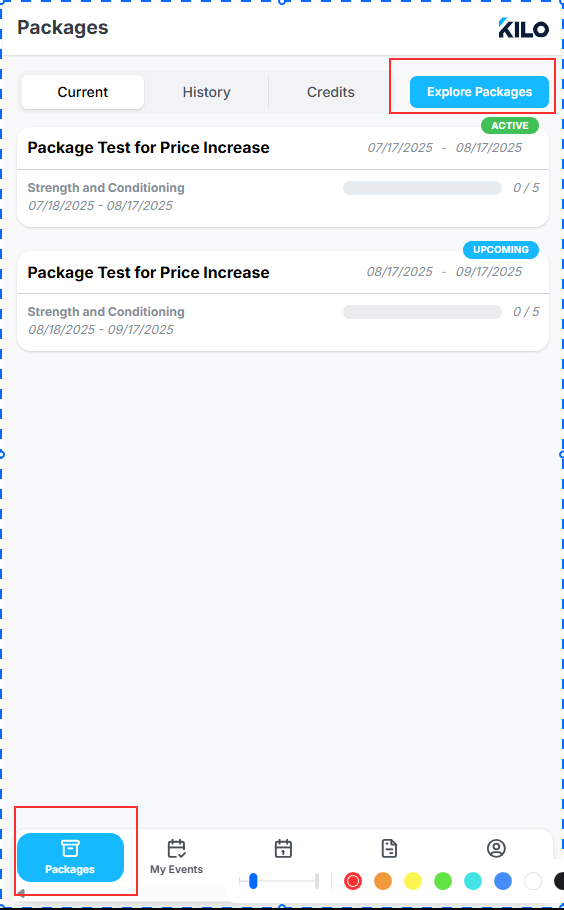
That way, you control how memberships are marketed—and athletes can purchase directly in the app under “Explore Packages” without needing to go through the website.
What’s new?
- Choose Sales Portal visibility, Athlete App visibility, or both.
- Athletes can now view and purchase directly in the app under “Explore Packages.”
Why this matters:
You control how memberships are marketed, while athletes get a simple checkout process.
Final Thoughts
These updates all share a common goal: less admin for you, less friction for members. From credits to contracts to cancellations, we’re making Kilo do more of the heavy lifting so you can focus on growing your gym.
As always, our Support team is here if you have questions: [email protected]