

In September, we hit a major milestone—Kilo Gym Management Software officially launched in the UK. Alongside this long-awaited rollout, we added tools to help gym owners everywhere run smoother operations: a new Class Usage Report for data-driven decisions, a Coach Availability feature to prevent scheduling headaches, and more flexible payment tracking.
All of these updates are designed to reduce admin work, improve member experience, and give you the clarity you need to keep growing.
Kilo GMS Launches in the UK
For years, UK gym owners have been asking—some emailing us month after month—when Kilo would be available to them. On September 1, we finally opened the doors. UK gyms can now run their businesses on the same platform that hundreds of North American gyms rely on, with all the local details handled for them.
What’s included:
- VAT support for tax compliance
- Local addresses, phone numbers, time zones, and currencies
About 5% of our customers are already in the UK, and that number is growing every year. With this launch, we’re ready to support even more gyms as they scale their businesses.
Why this matters:
Gym owners in the UK can now use one platform to handle their memberships, scheduling, and payments—without workarounds or mismatched systems.
Utilization Report: Class Usage
Ever wonder which classes keep your members coming back—or which ones might need a rethink? The new Class Usage Report gives you clear, reliable data so you can make informed decisions about scheduling, staffing, and programming.
From your Dashboard, click “Total Classes Last Week” to open the report. By default, it shows last week’s data, but you can filter it however you need.
What you can see:
- Which classes are most and least popular
- Attendance vs. no-shows and late cancels
- Coach and schedule performance
- Usage trends over time
How it works:
Group and filter data by class name, weekday, time of day, or coach—then download it as a CSV or Excel file. Attendance numbers come straight from Kilo’s logs, giving you an accurate picture of what’s happening in your gym.

Why this matters:
You’ll know which classes are worth doubling down on, which ones need attention, and how your coaching staff is performing—all key to keeping members engaged and improving retention.
Coach Availability
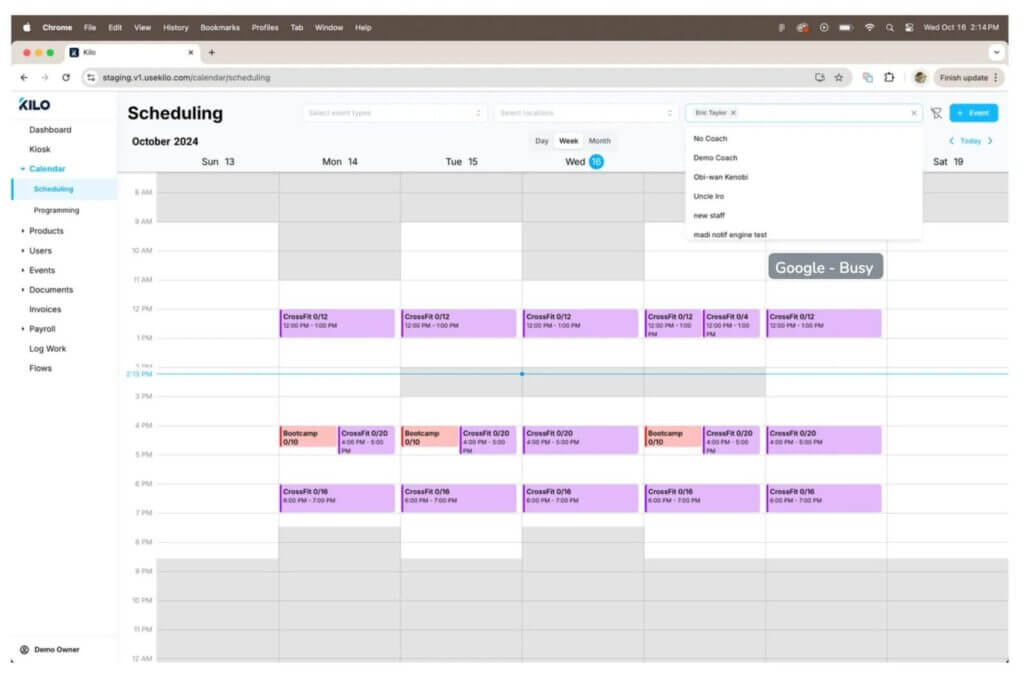
Managing coach schedules can be one of the most time-consuming parts of running a gym. With the new Coach Availability feature, coaches can set their own weekly schedules and create one-off exceptions for specific dates—right inside Kilo.
If they connect their Google Calendar, Kilo automatically blocks out busy times to prevent double-booking.
How it works:
- A new “Availability” menu lives under the Calendar dropdown for all staff.
- Weekly availability defaults to 24/7 open but can be edited by day.
- Coaches can add time windows or block off specific days.
- Unavailable times show up in grey on the calendar.
- When you select multiple coaches, only overlapping availability stays unshaded—so you instantly see when everyone’s free.

Why this matters:
You get fewer scheduling conflicts and spend less time chasing down coach availability, freeing up time to focus on members.
More Payment Options: E-Transfer, POS, and Gift Cards
Gym owners have asked for more ways to record and track payments accurately, and we delivered. You can now choose E-Transfer, Point of Sale (POS), and Gift Cards when manually entering charges—whether for memberships, retail items, or miscellaneous fees.
What’s new:
- These payment types show up in invoice details and summaries across the Athlete App, Staff App, and Desktop.
- Athletes can see them in their payment history.
- Refund and payment logic works the same as cash or checks.
- The POS option isn’t an integration—it’s simply a way to record that a payment was handled outside of Kilo.
Why this matters:
Cleaner reporting and more flexibility for how you handle transactions.
Final Thoughts
This month’s updates bring clarity and control where it matters most—helping you understand class performance, simplify coach scheduling, and handle payments your way. And for gym owners in the UK, it marks a new beginning: access to the tools they’ve been asking for and the support they need to grow.
As always, if you need help or have questions, our Support team is here for you: [email protected]